Browse the bioinformatics semantic web with the Tabulator software of W3C.
Try it and have fun.
http://www.w3.org/2005/ajar/tab
Before using read the doc and configure FireFox !
http://dig.csail.mit.edu/2005/ajar/ajaw/Help.html#Security
Thursday, May 10, 2007

Wednesday, May 09, 2007

Wednesday, April 11, 2007
Bio2RDF: Towards a Mashup to Build Bioinformatics Knowledge System
Our Bio2RDF paper is now available on the Workshop Web Site: Health Care and Life Sciences Data Integration for the Semantic Web held at the WWW2007 conference.
Tuesday, October 31, 2006
On halloween day Bio2RDF is coming out
For the one who have been waiting for this event, here is the first version of the "Bio2RDF server to go". Download it from sourceforge and install this jsp application under a Tomcat server.
We invite you to learn how to write your how rdfizer using the JSTL technology, it is fast and an elegant way to do it. The rdfizer for UniProt, GeneID, Genbank, OMIM, Pubmed, Entrez, GO, ENSEMBL and the PDB are available as GPL program in the /bio2rdf-jsp folder of the application. Read the source, it is a great way to learn for us.
Enjoy and send us your comments at bio2rdf@gmail.com.
We invite you to learn how to write your how rdfizer using the JSTL technology, it is fast and an elegant way to do it. The rdfizer for UniProt, GeneID, Genbank, OMIM, Pubmed, Entrez, GO, ENSEMBL and the PDB are available as GPL program in the /bio2rdf-jsp folder of the application. Read the source, it is a great way to learn for us.
Enjoy and send us your comments at bio2rdf@gmail.com.
Tuesday, September 12, 2006
Try querying Bio2RDF 50 millions triple store with SeRQL
It is now possible to query Bio2RDF triple store using Sesame's SeRQL query engine. The actual triple store contains all annotations about human and mouse from UniProt, Affymetrix and GeneID. It also contains all GO term definitions and OMIM disease description. It contains 50 millions triples and the native RDF store in sesame weigths 3 Go. Watch for the speed of it ! Thanks for the Sesame team for their great work.
This question illustrates the power of this semantic web technology :
This is the SeRQL corresponding query :
select distinct b1, u1, g1
from
{<http://bio2rdf.org/omim:602080>} <http://bio2rdf.org/bio2rdf#xOMIM> {b},
{b} rdfs:label {b1},
{b} <http://bio2rdf.org/bio2rdf#xOMIM> {c},
{d} <http://bio2rdf.org/affymetrix#xOMIM> {c},
{d} <http://bio2rdf.org/affymetrix#xSwissProt> {u},
{u} rdfs:label {u1},
{u} <http://bio2rdf.org/uniprot#xGO> {g},
{g} rdfs:label {g1}
union
select distinct b1, u1, g1
from
{<http://bio2rdf.org/omim:602080>} <http://bio2rdf.org/bio2rdf#xOMIM> {b},
{b} rdfs:label {b1},
{b} <http://bio2rdf.org/bio2rdf#xOMIM> {c},
{d} <http://bio2rdf.org/affymetrix#xOMIM> {c},
{d} <http://bio2rdf.org/affymetrix#xEntrez_Gene> {u},
{u} rdfs:label {u1},
{u} <http://bio2rdf.org/bio2rdf#xGO> {g},
{g} rdfs:label {g1}
Here is the where to submit it (click on SeRQL-S menu option):
Export result in tabulated format and analyse it with your favorite spreadsheet's pivot table tool.
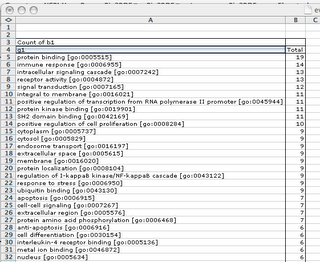 Possibilities are limitless. Enjoy.
This question illustrates the power of this semantic web technology :
What are the most significant GO terms associated to Paget disease according to UniProt and GeneID annotations using Affymetrix annotations as a crosstable ?
select distinct b1, u1, g1
from
{<http://bio2rdf.org/omim:602080>} <http://bio2rdf.org/bio2rdf#xOMIM> {b},
{b} rdfs:label {b1},
{b} <http://bio2rdf.org/bio2rdf#xOMIM> {c},
{d} <http://bio2rdf.org/affymetrix#xOMIM> {c},
{d} <http://bio2rdf.org/affymetrix#xSwissProt> {u},
{u} rdfs:label {u1},
{u} <http://bio2rdf.org/uniprot#xGO> {g},
{g} rdfs:label {g1}
union
select distinct b1, u1, g1
from
{<http://bio2rdf.org/omim:602080>} <http://bio2rdf.org/bio2rdf#xOMIM> {b},
{b} rdfs:label {b1},
{b} <http://bio2rdf.org/bio2rdf#xOMIM> {c},
{d} <http://bio2rdf.org/affymetrix#xOMIM> {c},
{d} <http://bio2rdf.org/affymetrix#xEntrez_Gene> {u},
{u} rdfs:label {u1},
{u} <http://bio2rdf.org/bio2rdf#xGO> {g},
{g} rdfs:label {g1}
Here is the where to submit it (click on SeRQL-S menu option)
Export result in tabulated format and analyse it with your favorite spreadsheet's pivot table tool.
 Possibilities are limitless. Enjoy.
Wednesday, August 30, 2006
Visit Bio2RDF with IBM's lsidBrowser
I have created a lsid proxy for Bio2RDF so that all available RDF document can be accessed with the corresponding lsid. For example http://bio2rdf.org/go:0000007 is accessible through the following lsid urn:lsid:bio2rdf.org:go:0000007.
To install this great Firefox plugin follow the instructions at http://lsid.biopathways.org/lsid_browser/. Then configure the network so that your lsid authority server is http://bio2rdf.org/authority.
Here is what the network configuration should look like :
This is it, you are all set. Try this links it should open in the XUL interactive interface of the lsidBrowser :
lsidres:urn:lsid:bio2rdf.org:mgi:96108
lsidres:urn:lsid:bio2rdf.org:geneid:3131
lsidres:urn:lsid:bio2rdf.org:uniprot:Q8BW74
lsidres:urn:lsid:bio2rdf.org:gi:1484862
lsidres:urn:lsid:bio2rdf.org:genbank:AA021027
lsidres:urn:lsid:bio2rdf.org:go:0048511
lsidres:urn:lsid:bio2rdf.org:pubmed:11641270
lsidres:urn:lsid:bio2rdf.org:omim:142385
Subscribe to:
Posts (Atom)